I hope that within the next few pages I can show you the basics,at least the basics as I
understand them,of the filesystem.First off you should know that windows is a shell built
on top of a dos system,you can consider windows a program really.you take away the dos,windows has no starting point.
Though with the advent of windows2000,which is made to run as the main system,point being there is no dos.I read
something that explains this to a point.
This is a quote I copied off"smiling while I write this"techtv,but it sayes it plain as can be,oh and by the way visit techtv they
cover alot of problems with windows and how to fix them.
You see, when Windows first came out, it was just another program that sat on top of DOS-- except it went on to take over
the entire machine. When the operating system got much bigger with the advent of Win95, DOS continued to reside beneath it. Problem is,
a 32-bit version of Windows, like Win95, sitting on top of MS-DOS is like John Candy sitting on a plastic tricycle. In both cases,
crashes are inevitable.
So with this as an understanding you will understand also some of the reasons why windows does not run right at all times.
Ok for beginers to discrib how a computer starts up.First thing when you turn on the computer,and power runs into the motherboard,
the bios is the first to start"basic instructions on starting"(b.i.o.s.)the bios contains the hardware proporties setups you have
made,and can change at anytime,these instructions set the parramators for the motherboard,harddrives,cpu,ram and any hardware placed in the isa or pic bus's,
along with the the video.So you see the bios is what starts the computer,from the bios it is also set which drive the computer will
read from to start whatever operating system is on it,most cases it starts from the "A" drive the floppy drive.If
there is no bootdisk there it will read from the next in line,default is the "C" drive,but you can set it to read any drive to boot from.
Windows by default loads into the "C" drive unless you request another drive.From there it loads the command.com,which is the start of the windows system,
from there it starts the system registry,and then the bootlog
is created.from there the io.sys file is read and the config.sys file and the autoexec.bat file,from there the windows win.sys file is ran,
which loads the windows vxd drivers and then the rest of the windows interface loads.Anywhere within this process something can go wrong,
just one missed placed or deleted file can stop a system from running,and making it a must to run windows back in again,luckly with windows 98
you can run the system over itself and replace all missing files,and not lose your files.You can with windows95 but not as easy as 98.So
the first section of the "C" drive contains those files that will run first.Command.com starts it all.
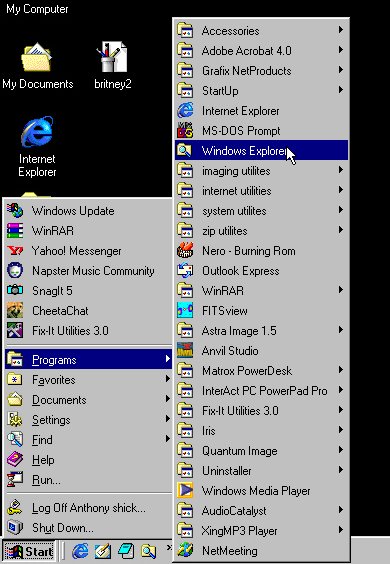
This is the easyest way to the files system,windows explorer.Location on the start menu,programs lists section.
I made a shortcut and placed it on my taskbar for a quicklink,as I have more then one drive and I'am always doing something
on the computer.
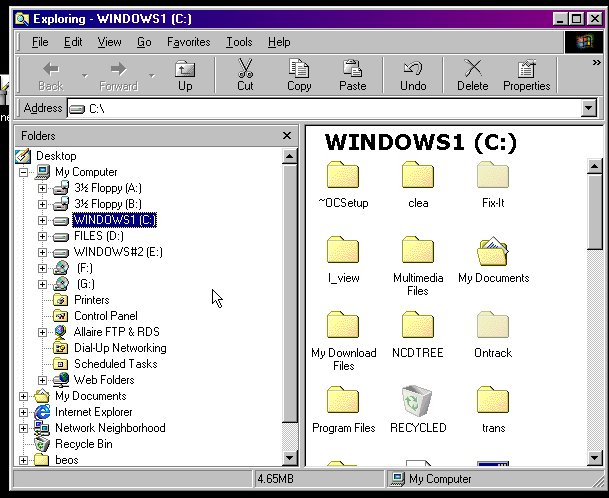
Let me first take this chance to explain the folder,you are all familar with the back and forward buttons,
the up button wil move you up one step in the directory,the cut is as it says,it will cut a folder or file and then you can go to
another folder and paste that file or folder.Its like coping and pasting,but here you are moving this file"cut from and paste to".
Mess up and there is the undo,very handy for those of us who talk on the phone or chat online,while playing around in the
windows files system!Hey accidents happen,and if someone tells you they never messed up a computer by doing something stupid,
you can bet they are just trying to save face,by telling you so,regardless of how much they know now,at one time they knew nothing!
And I'll not claim to know everything,hell I'am just lucky with things myself,but I understand how they work and with that I can do
alot with them.So hey your not dumb or stupid if you do not know,ask someone who does,most people will help you,if not page me I'll do
my best to help you."rich_1020 @yahoo or msn or excite,emails are the same name and at those sites.The delete of course will delete
any file or folder that is highlighted.The proporties will also show the proporties of any file or folder highlighted.The view
is how files are shown.The delete,cut paste and proporties all can be used by right clicking on a file too.
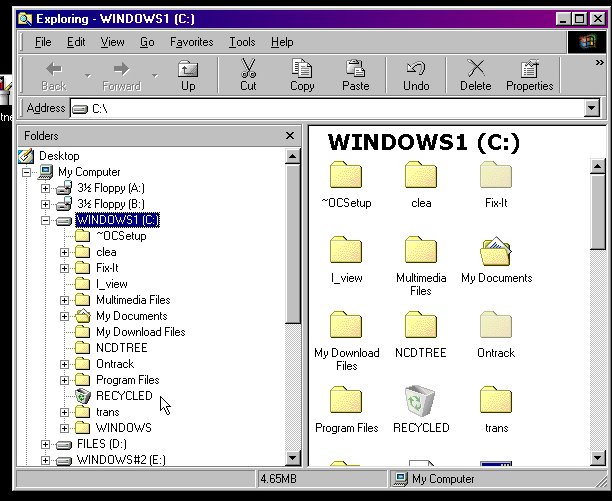
In this you see the file system directory,the "C" drive and the folers are standard for the
most part,and the files here are what start your computer.These files refer to and direct the computer to other files.
You will notice in the directory the my documents folder,program files,recycled and windows.These are the tipical windows folders
installed on your computer,the others where placed her by programs installed on the computer.For instance,ncdtree,was placed here
and in the root directory of each drive on my computer,it is the log folder for norton antivirus.Ontrack is another antivirus program,
that is part of another program I have installed also.Some programs will install into the root directory,
regardless.