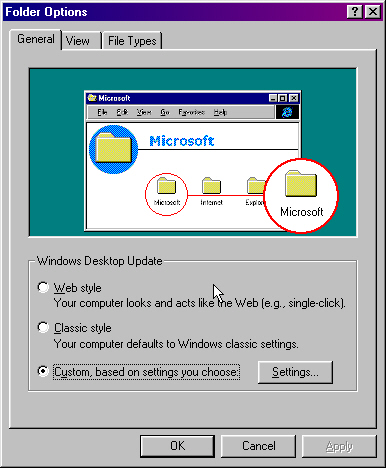
Within the folder options you can adjust many aspects of how folders are viewed.
You can view them like web pages or the windows classic style or custom,for which you can adjust
most aspects with.
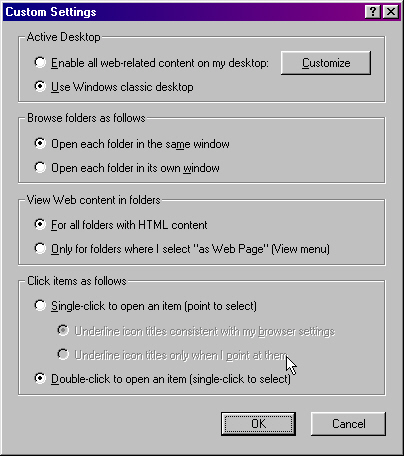
You can set within the custom settings,things like the active desktop,which deteremins
how web content is viewed.How folders open weather it is reuseing the same window or opening
a new window.Folders that you choice to,you can set how the web content is viewed.You can also
set how you click on folders and icons,weather it is with one click or a double click,to open them.
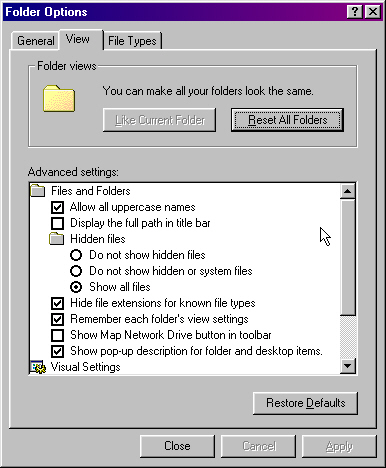
As it sayes you can reset all floders to look the same at any time.The advanced
settings are how things appear in the folder,to allow all uppercase names,will let you
name files and folders in capital letters"windows and dos does not like to use capital letters
as file names".The full path refered to here is stated like so"C:/WINDOWS/DESKTOP/MY DOCUMENTS/NEWFILE.TXT"
,that is to mean the file called newfile.txt is in the my documents folder on the desktop under the windows section on drive C.
So to check display the full path in title bar,can be handy to you.Its best to leave hidden files as they are,hidded,these files are unique to the system,
and any changes to them affects the system as a whole,if you was to accidently delete or move a hidden
file it might prevent the computer from rebooting.File extensions is the same a file format,its just as well
to leave this one unchecked,so that you will not have to hit the file,to find its proporties.
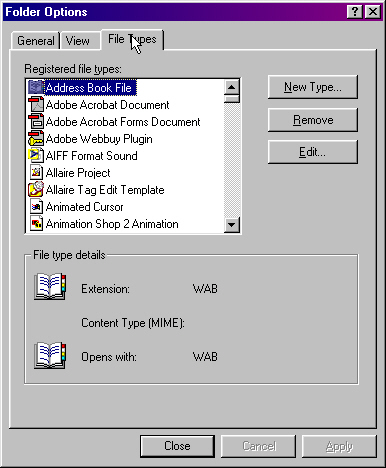
You can refer to this to configure what programs will open what file formats,you can change the file
extension at anytime.But be sure to use a program that will open the file.