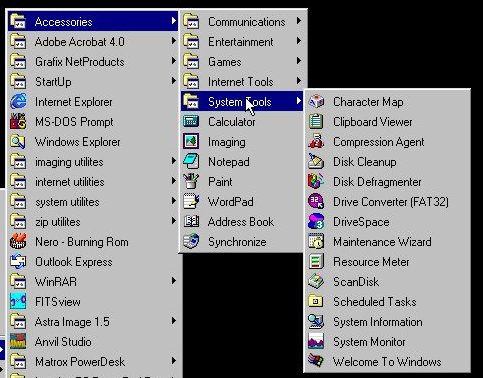
The Accessories contains quick links to various programs of which are supplied with windows.
You have the calculator,imaging,notepad,paint,wordpad and most times the address book.
Also there are the folders,communications,entertainment,games,internet tools and system tools.
Each of which has quicklinks to utilities of their own nature.
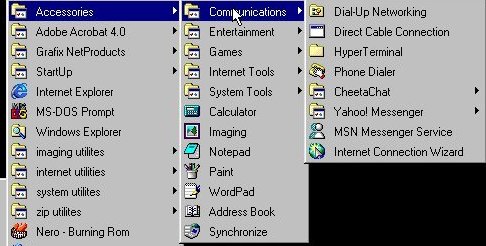
Communications has the dail-up networking,hyper terminal,phone dialerand internet connection wizard.
Though I have placed the other quick links here,to break down the rest of the start menu size.You will use the
connection wizard to configure your modem or what ever hardware you have to connect to the internet,all the connections
you make will be placed in the dial-up networking folder,but when you double click the explorer icon,
it will bring up the medon dialer,and there you can chose from any service provider you have configured.
Hyper terminal is used for newsgroups mostly or a contions between two computers,I use the direct cable connection
for this to communicate with other computers through a nullmodem cable.The phone dialer can be used to make conntections
with other comptuers,regardless of distance"beware though all charges are on you,but you do not need a server for this"
it can also be used for telephony too.
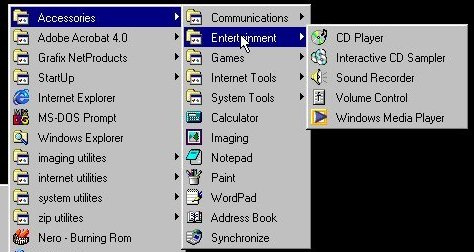
Entertainment contains quicklinks to the cd player,interactive cd sampler,sound recorder,
volume control and I have here also the windows media player.Most cd players autostart and if there is any media,
weather sound or video,the program to play such will autostart also.The sound recorder can be used to record sounds
from the web or anything played through the sound card,it is easy to configure.
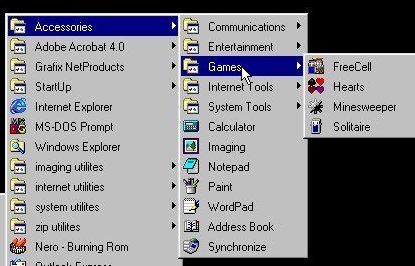
I don't believe I have to say much about games!But I most allways place other games I install into
my computer here also.Alot of things in the startmenu can make it confusing to say the lest.
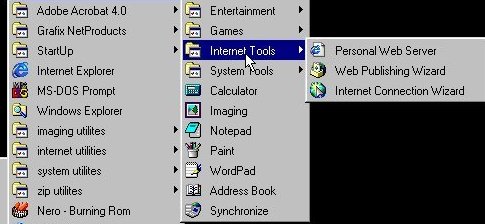
Most of you will never use the personal web server,if you do by that time you will have as much knowlege as I do about computers,
or close to it at least.The personal web server is as it means,to host a web site from your computer,but also it is helpfull
for creating sites too"but I find that I can use the explorer to do this with".the publishing wizard is used to upload your web pages that you have made.
Most of you will use frontpage or another web page builder,and they all have the publishing tools to use for this
,so you may never use this one here.
The system tools,you will find that alot of disk utilities that you will need to use are here,notabily the compresssion agent,disk cleanup,
disk defragmenter,drive converter(fat32),drivespace,maintenance wizard and sacndisk,along with the
system information.Most of you will not use the compression agent,and have no need to really ,the space of the harddrive these days
offer enough space not to worry about saving space.Disk clean up is a easy utility to use it emptys out the tempory files
folder and the recycle bin along with the internet tempory files,along with downloaded program fils"class files for viewing web pages.
Also it will dump offline web pages you have saved too.All aspects are of your choice and there is a good settings utility with this also.
The task manager will set certain tasks to be performed at certain times,mainly scandisk and defragmenter.Note other programs ca
be started at certain times with this also,but be carefull what you do with it,as I have tryed a few things and the antivirus scaner did not like it!!
You can run the scandisk and defragmenter at anytime,I sugjust to run it weekly,unless you do alot of image processing,which tends to use
alot of cache space,"note what space is not used for program files and other files will be used for the system cache,there for the cache can displace alot
of files,and slow a system down".Drive converter(fat32) is used to convert a harddrive that is fat16,"note a limit is placed on the size a drive can be to be fat32,
512 megabytes is the smallesr drive that will support fat32."Most of you will never have to worry about this,and can uninstall this feature along with drivespace too.
Though drive space may come in handy if you have smaller harddrives you may wish to use,because it compresses them and is used to mount them as compressed drives.
The system information,will give you all infomation on your computer,and is very usefull to finding problem devices,it does cover all aspects of what is in your computer.
Example;if your modem is not working and you open this,you will find most times the driver is not properly installed,or the port settings are wrong,it is usefull in
daignosing problems within your computer.The clip board,everytime you copy something it is saved to the clip board,until you paste it to another applacation,note;
the clip board can use up alot of memory when you process data or image files,but in most cases when you close the program you are useing,windows will ask you if you wish
to save the files on the clip board to be used with other programs.Most times you have done so allready so can just empty it.You can use Character Map to
insert special characters into a document,play with it to see the diffrent things you can use.